Check website from different locations tools: how to test any URL globally
Compare check website from different locations tools, test a URL from different countries, and catch regional SEO, CDN, and availability issues.
- Published
- Reading time
- 19 min read
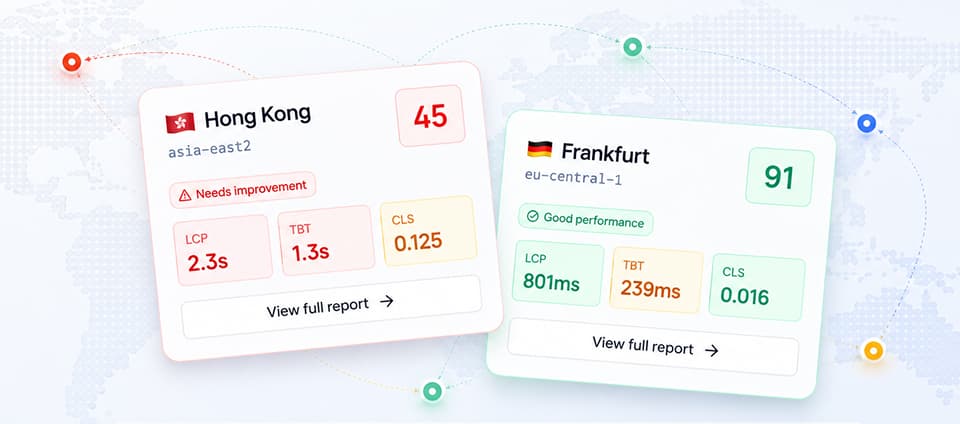
Your website can look healthy from your office and still fail for people in another country. A single local test can miss slow DNS paths, cold CDN edges, blocked third-party scripts, localized redirects, and pages that behave differently once the request starts outside your home market.
That is why teams use check website from different locations tools before they ship major pages, launch into new markets, or investigate traffic drops from one region. The goal is simple: see the page from the same kind of network path your users and crawlers may take.
If you already have a URL you want to inspect, run a free regional website check and compare the report before reading the rest of this guide.
What does it mean to check a website from different locations?
To check a website from different locations, you request the same URL from more than one geographic region and compare the results. A useful test does more than say whether the page is online. It shows whether the page loads, renders, and exposes the same important content across regions.
For technical SEO and performance work, that usually means comparing:
- The HTTP status code and redirect chain.
- Time to first byte for the HTML document.
- Largest Contentful Paint and other user-visible performance metrics.
- Screenshots or rendered output.
- Failed requests, blocked assets, or delayed third-party scripts.
- Canonical tags, hreflang tags, and crawlable links.
This matters because location changes the request path. A visitor in Chicago, London, Mumbai, and Sydney may hit different CDN edges, DNS resolvers, routing rules, consent flows, or localization logic. A crawler may see another version again.
The practical question is not "does the website work for me?" It is "does the website work from the places that matter to the business?"
Why one local test is not enough
Most debugging starts from one browser on one network. That is fine for obvious UI bugs, but it is weak evidence for regional performance and availability.
One local check can hide several classes of problems.
CDN and cache behavior can vary by region
A CDN may serve cached assets quickly near one region while sending other users back to a distant origin. The page may pass a local Lighthouse run but slow down sharply when HTML, JavaScript, fonts, or images miss cache somewhere else.
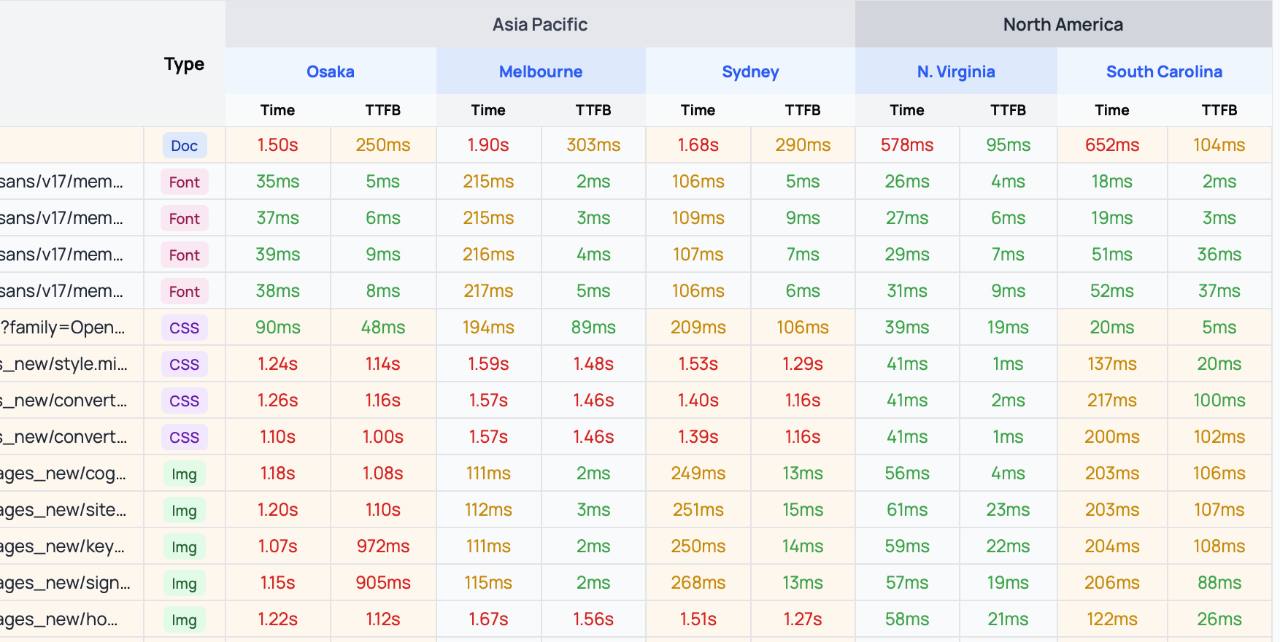
When you test website from different locations, these gaps become visible. One region may load the main document in 200 ms while another waits several seconds before rendering starts.
DNS and routing can send users down slower paths
Regional DNS routing is useful when it works. When it is misconfigured, visitors can be sent to the wrong origin, the wrong CDN provider, or a route with unnecessary latency.
This is hard to detect from your own laptop because your resolver and network path are only one sample. A multi-location test gives you a broader view of how requests reach your site.
Localized redirects can break the page
Many sites redirect users by country or language. That logic can create SEO and UX problems when it is too aggressive.
Common examples include:
- A US product URL redirecting every EU visitor to a generic homepage.
- A localized page returning a soft 404 because the product is not mapped.
- A language selector blocking access to the real page.
- A cookie banner delaying rendering in one jurisdiction but not another.
If you need to test your website in different countries, redirects are often the first thing to inspect.
Third-party scripts may load differently
Analytics, ads, chat widgets, consent tools, A/B testing scripts, and payment providers can behave differently by region. Some are blocked, some are slow, and some inject extra layout shifts.
That can damage Core Web Vitals even when your own code is well optimized. A regional check helps separate first-party performance from third-party delay.
Search systems do not crawl from your desk
Technical SEO depends on what search systems can fetch, render, and understand. A page that is fast and complete in one location may be slower, thinner, or redirected elsewhere from another location.
Regional testing does not replace Search Console, log files, or crawl tools. It gives you evidence you can act on when rankings, crawl behavior, or international SEO performance do not match expectations.
When should you test your site from another country?
You do not need to run a global test for every text edit. Use location testing when regional differences can change the outcome.
Good triggers include:
- Launching a new country, language, or market page.
- Changing CDN, DNS, hosting, WAF, or edge middleware rules.
- Releasing a landing page for paid traffic in a new region.
- Investigating slower conversions from one country.
- Debugging "it works here, but not there" support reports.
- Checking whether Googlebot can reach and render important pages.
- Reviewing a competitor's experience from another country for SERP research.
- Preparing a migration that changes redirects, canonical URLs, or hreflang.
For ecommerce and SaaS teams, this is also useful before seasonal campaigns. A checkout, pricing page, or trial signup flow that fails in one target country can waste paid traffic quickly.
What the best check website from different locations tools should show
Many tools can view website from another country. The useful ones give enough evidence to diagnose the problem, not just confirm that the page responded.
Look for these capabilities.
Multiple useful regions
A tool should cover the regions where your users, prospects, or search visibility matter. More locations are not always better. A focused set of regions is more useful when it matches your market.
For a US-led site, that might mean testing from North America first, then adding Europe and Asia-Pacific if you sell or rank there. For an international SaaS site, you may want a baseline region near your origin plus regions near key customer segments.
Rendered page evidence
Status codes and response times are not enough. A page can return 200 and still render a blank screen, blocked app shell, wrong language, or a cookie wall that hides the main content.
Screenshots, rendered HTML, and visible content checks help you confirm what a user or crawler actually receives.
Performance metrics that point to causes
Useful regional reports separate symptoms from causes. A slow score is a symptom. The cause may be a distant origin, a large hero image, blocking JavaScript, a slow font, or a third-party request.
At minimum, compare:
- Time to first byte.
- Largest Contentful Paint.
- Total Blocking Time.
- Cumulative Layout Shift.
- Total transferred bytes.
- Slowest requests and their hostnames.
For a practical workflow, compare the fastest and slowest regions side by side instead of reading one score in isolation.
Redirect and status-code visibility
If your page redirects by country, you need to see the full redirect chain. A final 200 response can hide a chain that wastes seconds or sends users through the wrong URL.
For SEO work, confirm that regional redirects do not block crawlable access to the canonical URL unless that behavior is intentional.
Repeatable reports
A one-off screenshot is helpful, but repeatability is better. You need to compare before and after fixes, share evidence with engineering, and rerun the same URL after a deployment.
That is where a report-based workflow beats a manual proxy check.
Types of tools for viewing a site from another country
The SEO brief for this article includes several SERP competitors in this topic, including geolocation browsers, website reachability tools, device testing platforms, and regional performance tools. They do not all solve the same problem.
Here is the practical split.
| Tool type | Best for | Limitation |
|---|---|---|
| Geo browsing tools | Manually view website from another country | Often weaker on performance diagnostics |
| VPNs and proxies | Quick manual reproduction | Results depend on provider quality and browser setup |
| Device/browser testing platforms | Cross-browser QA and device coverage | Can be heavier than needed for SEO checks |
| Uptime and reachability monitors | Availability from multiple regions | May not render the page or inspect content |
| Performance audit tools | Regional speed, rendering, and diagnostics | Should be checked for the locations you need |
| SERP preview tools | Country-specific search result checks | Not a page performance or rendering test |
For LightKeeper's use case, the main need is regional website analysis: enter a URL, run checks from different locations, and compare the evidence in a report.
Best check website from different locations tools and methods
The best option depends on what you need to prove. A marketer who wants to view site from another country has a different job than an SEO fixing crawl access, a developer debugging an edge rewrite, or a QA team validating checkout in a new market.
Use this comparison before choosing a tool.
| Method | What it proves | What it does not prove | Use it when |
|---|---|---|---|
| LightKeeper regional check | Whether a URL loads, renders, and performs from target regions | Full manual browser control | You need a fast report for SEO, performance, or launch review |
| Geo browser | What a page looks like from a selected country | Repeatable performance diagnostics | You need to view website in different country and confirm visible content |
| VPN or proxy | Whether you can reproduce a regional experience manually | Clean measurement or stable test conditions | Support needs a quick "does it happen from there?" check |
| Uptime monitor | Whether the server responds from multiple regions | Rendered content, Core Web Vitals, or SEO tags | Availability is the only question |
| Browser testing platform | Device and browser behavior from remote environments | Lightweight SEO triage | QA needs to test site from different locations across devices |
| CDN, edge, or RUM logs | Real production traffic patterns | What a new URL will do before launch | You need post-launch evidence from real users |
No single method is perfect. The mistake is using a lightweight visibility tool as if it were a diagnostic report, or using an enterprise QA platform for a simple SEO reachability question.
When a regional check is better than a VPN
A VPN is useful when you need to browse manually. It is less useful when you need repeatable evidence that someone else can review.
For example, a VPN can show that a pricing page redirects in Germany. It usually will not give your engineering team a clean side-by-side report with status code, redirect chain, screenshot, LCP, TTFB, and failed requests from each region.
Use a regional report when the result must become a ticket, a launch gate, or a before-and-after comparison.
When this is a GTmetrix alternative
If your only question is "why is this page slow?", a performance testing tool may be enough. If your question is "does this URL work the same way from the countries that matter?", you need a regional website check.
That makes LightKeeper a GTmetrix alternative for teams that care less about one isolated lab score and more about regional differences: status codes, redirects, rendered content, Core Web Vitals, and market-specific failures in one workflow.
What to compare before choosing a tool
Before you pick a check website from different locations tool, compare the evidence it gives you.
Look for:
- Country or region coverage that matches your traffic.
- Status code and redirect-chain visibility.
- Rendered screenshots or visible content checks.
- Core Web Vitals or Lighthouse-style metrics.
- Failed request and third-party host details.
- Shareable report URLs for engineering and SEO tickets.
- A simple form flow for one-off checks.
- Repeatability, so the same URL can be rerun after a fix.
Pricing also matters, but do not compare only by plan cost. A cheap tool that only shows a screenshot may be expensive if it sends a developer into guesswork. A heavier platform may be unnecessary if you only need to check website availability from multiple locations before a campaign.
If you are evaluating tools right now, start with one production URL and one known target market. Run the same URL through each candidate and compare which report gives you the clearest next action.
Need a baseline report first? Run a free LightKeeper regional check and compare the result with any manual proxy, geo browser, or monitoring tool you already use.
How to test your website in different countries
Use a consistent process. Random spot checks create noise. A repeatable workflow helps you find real differences and prove that a fix worked.
1. Pick the URL and expected behavior
Start with one important URL. Define what should happen before you run the test.
For example:
- The URL should return 200 in every tested region.
- It should not redirect to a country homepage.
- The canonical URL should stay stable.
- The primary content should render without interaction.
- The signup or audit form should be visible.
- LCP should stay within an acceptable range.
This gives you a baseline for interpreting the report.
2. Choose locations that match real traffic
Do not test every possible country first. Choose locations tied to revenue, search demand, paid campaigns, or support complaints.
A practical starter set:
- One location near your main origin or hosting region.
- One location in your largest customer market.
- One location in a market where performance is suspected to be worse.
- One location in a market with different consent or localization behavior.
If the report shows a clear regional gap, add more locations to isolate the pattern.
3. Run the same URL from each location
Use the same page, same test settings, and same timing window. If you change too many variables, you will not know whether the difference came from region, device, network, cache state, or deployment timing.
For quick checks, use the embedded LightKeeper audit form above or start from the LightKeeper homepage.
4. Compare the fastest and slowest regions
Do not stare at averages first. Compare a good region with a bad region.
Look for the first meaningful difference:
- Does the slow region wait longer for HTML?
- Does it download more bytes?
- Does it load a different image or script bundle?
- Does it hit a different redirect chain?
- Does a third-party host delay rendering?
- Does the screenshot show missing content or a different page?
The first divergence usually tells you where to investigate.
5. Fix the cause, then rerun the same check
Regional problems often sit outside the component that appears broken. A slow LCP image may be a CDN cache issue. A blank screen may be an edge rewrite issue. A missing CTA may be a country-specific experiment.
After the fix, rerun the same URL from the same locations. Keep the before and after reports so engineering, SEO, and marketing teams can agree on the result.
What to look for in the report
A regional website report should help you answer three questions.
Is the page reachable?
Start with the basics: status code, redirects, TLS, DNS, and blocked requests. If one region cannot fetch the page reliably, performance metrics are secondary.
Watch for:
- 403 responses from WAF or bot-protection rules.
- 5xx errors from one origin or edge.
- Redirect loops.
- Region-specific maintenance pages.
- Mixed content or certificate errors.
Is the page the right page?
Availability is not enough. Confirm that the final rendered page is the one you expect.
For SEO pages, check:
- The page title and main heading.
- The canonical URL.
- Hreflang annotations.
- Internal links.
- Product or article content.
- Visible CTAs.
If a test site from another country lands on a different page, document whether that behavior is intended.
Is the page fast enough from each target market?
Compare user-visible speed, not just server timing. A fast HTML response can still lead to a slow page if JavaScript blocks rendering or the hero image is too heavy.
Focus on the metrics a user feels:
- LCP for when the main content appears.
- TBT for how long the page is blocked by scripts.
- CLS for whether the layout jumps.
- Screenshots for whether the page looks complete.
Then connect the symptom to a specific request, script, asset, or redirect.
Common regional issues and likely fixes
Use this table when a multi-location check finds a gap.
| Symptom | Likely cause | Fix to investigate |
|---|---|---|
| Slow HTML in one region | Origin is far away or CDN misses cache | Cache HTML where safe, tune CDN rules, review origin routing |
| Same URL redirects differently by country | Geo redirect rules or locale middleware | Allow direct access to canonical URLs, audit hreflang and locale logic |
| Blank app shell in one region | Blocked JavaScript, WAF rule, or failed API call | Inspect failed requests and relax false-positive security rules |
| High LCP only in distant markets | Unoptimized image path or cold edge cache | Resize images, preload the right asset, cache closer to users |
| High TBT in all regions | Heavy JavaScript bundle or third-party scripts | Reduce client JavaScript, defer noncritical scripts |
| Cookie banner blocks content in some countries | Consent tool configuration | Keep main content visible and crawlable where legally possible |
| Payment or signup fails abroad | Country-specific provider, currency, or fraud rule | Test the full flow from target markets before campaigns |
The fix is not always a frontend change. Regional findings often point to infrastructure, edge rules, security settings, third-party vendors, or content localization.
How this supports global SEO
Global SEO is not only translated content and hreflang. Search visibility also depends on whether important pages are accessible, fast, and consistent enough for users and crawlers in target markets.
Location testing supports global SEO in four concrete ways.
It protects crawlable access
Search systems need stable access to important URLs. If a region-specific redirect hides the canonical page, or a WAF rule blocks requests from unfamiliar locations, crawlers may see a weaker version of your site.
For crawlability work, keep the same discipline: confirm that important URLs return stable HTML, canonical tags, and crawlable links from the regions you care about.
It catches market-specific UX problems
SEO traffic only helps if the page can convert. A CTA that appears in the US but disappears in Germany, a pricing page that redirects users away from their plan, or a slow checkout in Australia can turn rankings into wasted traffic.
Testing from target countries helps SEO, growth, and product teams work from the same evidence.
It validates international launches
Before launching a new market, test the pages that matter:
- Homepage.
- Category or service pages.
- Pricing.
- Signup.
- Contact or demo request.
- High-value blog posts.
- Legal and consent pages.
A short regional test before launch is cheaper than diagnosing lost traffic after launch.
It gives engineering a reproducible bug report
"The site is slow in Europe" is hard to fix. A report showing a slow TTFB from Frankfurt, a different redirect chain, and a screenshot of the rendered page is actionable.
Good evidence reduces back-and-forth and makes prioritization easier.
Choosing a check website from different locations tool
Use the tool that matches the job.
If you only need to see how a page looks from a country, a geo browser or proxy may be enough. If you need technical SEO evidence, choose a tool that records status codes, redirects, rendered output, and performance data. If you need full device QA, use a browser testing platform.
For recurring SEO and performance checks, prioritize:
- Locations that match your market.
- Clear before and after reports.
- Screenshots and rendered-page evidence.
- Lighthouse-style performance metrics.
- Redirect and failure visibility.
- Shareable reports for engineers and marketers.
- A fast form-based workflow for checking one URL without setup.
LightKeeper is built around that last workflow: submit a URL, run a regional performance audit, and use the report to decide what to fix first.
For SEO teams, the deciding factor is actionability. A report should make the next step obvious:
- If the final status code changes by country, inspect redirects, WAF rules, and locale middleware.
- If the page renders different content, inspect personalization, consent tools, experiments, and country targeting.
- If one region has slow HTML, inspect DNS, origin routing, CDN cache behavior, and edge configuration.
- If every region has high TBT, inspect JavaScript and third-party scripts before blaming geography.
- If a paid campaign market fails, pause expansion until the report is clean for that market.
That is the difference between a tool that simply lets you view website from another country and a tool that helps you decide what to fix.
Quick checklist before publishing or launching
Before a campaign, migration, or market launch, run this checklist.
- Test the final production URL, not a staging URL.
- Include the regions tied to campaign traffic or organic search opportunity.
- Confirm the final status code is expected.
- Review the full redirect chain.
- Check that the rendered screenshot shows the right page.
- Confirm important links and CTAs are visible.
- Compare LCP, TBT, CLS, TTFB, and transferred bytes by region.
- Investigate the first request or asset that differs in the slowest region.
- Fix the cause, then rerun the same URL from the same locations.
- Save the report with the launch notes or SEO ticket.
FAQ
How can I view my website from another country?
Use a regional website testing tool, geo browser, proxy, or VPN to request the page from another country. For SEO and performance work, choose a tool that also shows redirects, rendered screenshots, and speed metrics.
How do I view site from another country without changing my browser setup?
Use a web-based geo browser or regional testing form. Enter the URL, choose the country or region if the tool supports it, and inspect the rendered result. This is cleaner than changing your whole browser through a VPN when you only need to check one page.
How do I test website from another country for SEO?
Start with the final production URL. Check the status code, redirect chain, canonical tag, hreflang tags, rendered title, main content, and internal links from the target country. Then compare performance metrics and screenshots against your baseline region.
How do I check website availability from multiple locations?
Run the same URL from several regions and compare status codes, redirects, and load results. Availability checks tell you whether the page responds. Rendered reports tell you whether the right page appears.
How do I check website from multiple locations before a launch?
Pick the pages that matter most: homepage, pricing, signup, campaign landing pages, market pages, and high-value SEO pages. Test each URL from the regions tied to traffic, revenue, or launch risk. Save the reports with the launch checklist so fixes can be verified later.
What is the difference between a VPN and a website location testing tool?
A VPN changes your browsing location for manual testing. A website location testing tool records structured evidence, such as timing, screenshots, status codes, and regional comparisons. Use a VPN for quick reproduction and a report-based tool for SEO or engineering work.
Is LightKeeper a GTmetrix alternative?
It can be, depending on the job. If you only need a single-page lab performance score, a dedicated speed test may be enough. If you need to compare a URL across regions and connect performance with status codes, redirects, rendered output, and availability, LightKeeper covers a broader regional SEO workflow.
Should I test every page from every country?
No. Start with high-value URLs and high-value markets. Test the homepage, conversion pages, market landing pages, and pages that drive organic traffic. Add more pages when a report shows a pattern.
Can regional testing improve Core Web Vitals?
It can help you find causes that a single lab test misses. Regional testing will not fix Core Web Vitals by itself, but it can reveal slow HTML, uncached assets, blocking scripts, or layout shifts that affect users in specific markets.
Start with one URL
The fastest way to find regional issues is to test a real page. Choose a page tied to organic traffic, paid traffic, or signups. Run it from the locations that matter. Compare the evidence. Fix the first clear gap.
Start with the LightKeeper regional website check, then use the report to decide whether the problem is content, code, infrastructure, or a third-party dependency.